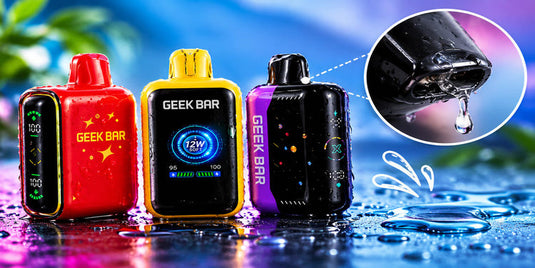
If you're a Geek Bar fan, your device probably goes everywhere with you. But sometimes it suddenly feels clogged, and you're left asking, "Why is my Geek Bar clogged?" In most cases, e-liquid or lint is blocking the airway. Vapor cools into liquid and pools in the mouthpiece, long pulls flood the coil, lint or a leftover sticker covers the air vents, or cold weather thickens the e-liquid. To fix it, tap out the trapped liquid, clean the mouthpiece and vents, and warm the device to room temperature.
Most clogs clear up in a few minutes with nothing more than a paper towel. Below, we'll show you how to spot a clog, what causes it, and the six steps we recommend to get your Geek Bar hitting again. We'll also share simple habits that keep clogs from coming back.
Explore Our Categories


Table of contents
How to Tell If Your Geek Bar Is Clogged
Not every weak hit is a clog. A Geek Bar vape clogged with condensation usually still powers on, but the draw feels tight and the vapor is thin. Match what you notice to the most likely cause below.

What You Notice |
Likely Cause |
What to Try First |
Tight, hard draw with little vapor |
Condensation or lint in the airway |
Tap out and wipe the mouthpiece |
Gurgling or crackling sound |
Extra e-liquid pooled near the coil |
Tap out the liquid and take gentle puffs |
Drops of e-liquid in your mouth |
Flooded mouthpiece |
Blow it out over a paper towel |
Screen shows battery and e-liquid, but puffs make no vapor |
Blocked vents or a stuck puff sensor |
Clean the vents and restart the device |
Easy draw, little vapor, burnt taste |
Empty e-liquid tank, not a clog |
Check the e-liquid indicator |
No lights or screen at all |
Dead battery |
Charge it with a USB-C cable |
If the drawer feels open but you get a burnt taste, your device is most likely out of e-liquid. Cleaning won't fix that, since Geek Bar disposables can't be refilled.
Why Do Geek Bars Clog?
Geek Bars clog when e-liquid or debris sits where air needs to flow. These are the six most common causes of a clogged disposable vape.
1. Condensation in the Mouthpiece
Warm vapor cools as it travels up the mouthpiece, and some of it turns back into tiny drops of liquid. Over hundreds of puffs, those drops pool and narrow the airway.
2. Hard Pulls and Chain Vaping
A long, forceful pull draws e-liquid into the coil faster than the coil can turn it into vapor. Taking puff after puff without a break does the same thing. The extra liquid floods the coil and spills into the airway. Boost settings, like Pulse Mode on Geek Bar Pulse models, make more vapor per puff, which can also mean more condensation.
3. Blocked Air Vents
Your Geek Bar pulls air in through small vents near the bottom. Pocket lint, dust, and crumbs can settle there. On a new device, the silicone mouthpiece plug, or a sticker on the base, will also block airflow if you forget to remove it.
4. Cold Temperatures
E-liquid gets thicker in the cold. If you leave your Geek Bar in the car overnight or carry it outside in winter, the liquid can't soak into the wick fast enough. The result is a weak, sluggish draw.
5. Storage Position and Heat
Storing your device on its side or upside down for long periods lets e-liquid seep toward the airway. High heat causes problems, too. It thins the e-liquid, which makes leaks and flooding more likely.
6. A Stuck Puff Sensor
Your Geek Bar fires when a sensor detects your draw. If e-liquid reaches that sensor, it can stop registering your puffs. The screen may still show battery and e-liquid levels, but your puffs produce no vapor.
How to Unclog a Geek Bar in 6 Steps
These steps work for most Geek Bar models, including the Geek Bar Pulse, Geek Bar Pulse X, Geek Bar Skyview, Geek Bar Pulse 2, Geek Bar Pulse X2 and they double as a general guide for how to unclog a disposable vape from other brands. Here's the quick version: check the basics, tap out the trapped liquid, wipe the mouthpiece and vents, blow out the airway, warm the device, and take a few gentle test puffs. Test your device after each step.
Step 1: Check the Basics
Make sure you've removed the silicone mouthpiece plug and any stickers on the base. Then check the screen for battery and e-liquid levels. If the battery is low, charge it before you go any further.
Step 2: Tap Out the Trapped E-Liquid
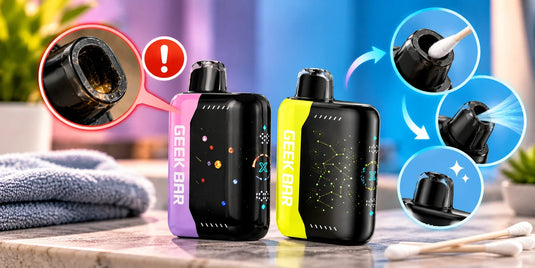
Hold your Geek Bar with the mouthpiece facing down over a paper towel. Gently tap the side of the device against your palm five or six times. You should see small drops of e-liquid land on the towel.
Step 3: Wipe the Mouthpiece and Air Vents
Twist a corner of the paper towel into a thin point and use it to soak up liquid inside the mouthpiece opening. A cotton swab works well for the air vents on the bottom. For stubborn lint, gently use a wooden toothpick around the edge of the opening only. Never push it deep inside.
Step 4: Blow Out the Airway
Hold a folded paper towel over the bottom vents. Place your lips on the mouthpiece and blow gently two or three times. Don't inhale during this step. The air pushes leftover liquid out through the vents and into the towel.
Step 5: Warm It Up
If your device has been in the cold, hold it in your hands for two to three minutes, or keep it in an inside pocket until it reaches room temperature. Warmer e-liquid flows into the wick more easily. Never use a hair dryer, microwave, stove, or hot water.
Step 6: Take a Few Gentle Test Puffs
Take three or four short, gentle puffs with a few seconds between each. If your model has a boost setting, use Regular Mode for these test puffs. Airflow and vapor should return to normal.

Still Not Working? Check These Next
If your Geek Bar is still not hitting after all six steps, the problem may not be a clog. Try these checks:
Charge the battery. Plug in your device with a USB-C cable and let it charge for a while before you try again.
Restart the device. If your model has a power or lock setting, turn it off, wait a few seconds, and turn it back on. Your device's manual shows the exact steps.
Check the e-liquid level. If the indicator shows empty, it's time for a new device.
Contact your retailer. Some devices have factory defects. If you bought yours from Geek Bar Now, contact our support team, and we'll help you sort it out.
What Not to Do With a Clogged Geek Bar
Some fixes you'll find online can damage your device or its battery. Skip these:
Don't push metal pins, paperclips, or needles deep into the mouthpiece. They can tear the wick or damage the coil.
Don't rinse your device with water or rubbing alcohol. Liquid can reach the battery and electronics.
Don't use direct heat, like a lighter, hair dryer, or microwave.
Don't pry the device open. Disposables are sealed, and opening one exposes the battery.
Don't keep pulling harder. Forceful pulls draw in more e-liquid and make the clog worse.
How to Keep Your Geek Bar From Clogging

A few easy habits go a long way:
Remove the silicone plug and any stickers as soon as you unbox a new device.
Take slow, steady puffs of two to three seconds.
Pause between puffs so the wick can keep up.
Store your device upright, with the mouthpiece facing up.
Keep it at room temperature, and avoid hot cars, direct sunlight, and freezing weather.
Carry it in a clean pocket, case, or bag to keep lint out of the vents.
Wipe the mouthpiece with a dry tissue every day or two.
Use Regular Mode for everyday vaping, and save Pulse Mode or other boost settings for when you want bigger clouds.
When It's Time to Replace Your Geek Bar
Each Geek Bar holds a set amount of e-liquid, and its puff count is an estimate based on average use. Once the e-liquid runs out, no fix will bring it back. It's time for a new device if you notice:
The e-liquid indicator shows empty.
A burnt taste that doesn't go away, even after a full charge.
No vapor after you've tried every step above.
Cracks, dents, or leaks in the body.
When you're done with your device, dispose of it responsibly. Disposable vapes contain lithium batteries, so check your local rules for battery or e-waste drop-off locations. Don't throw it in the household trash where that isn't allowed.
Shop Authentic Geek Bar Devices at Geek Bar Now
Buying from a trusted retailer is the easiest way to make sure you get a genuine Geek Bar. At Geek Bar Now, we carry authentic Geek Bar Pulse, Pulse X, and other popular models, so you can find your next favorite flavor in one place. You must be 21 or older to purchase.
WARNING: This product contains nicotine. Nicotine is an addictive chemical.
Frequently Asked Questions
How do I know if my Geek Bar is clogged or empty?
A clogged Geek Bar has a tight, hard draw with weak vapor but normal flavor, while an empty one has an easy draw and a burnt taste. On models with a screen, an empty device also shows a low or empty e-liquid indicator. If the indicator shows e-liquid left, try the unclogging steps first.
Can a clogged Geek Bar be fixed?
Yes, you can fix most clogged Geek Bars at home in a few minutes. Tap out the trapped e-liquid, wipe the mouthpiece and air vents, blow out the airway, and warm the device to room temperature. If it still won't hit, check the battery and the e-liquid level.
Why is my Geek Bar not hitting when the screen is on?
When the screen is on but you get no vapor, blocked air vents or a stuck puff sensor is the most likely cause. Clean the vents and mouthpiece, tap out any trapped e-liquid, and restart the device if your model allows it. If the e-liquid indicator shows empty, the device has simply run out.
Why is my Geek Bar gurgling?
Your Geek Bar gurgles when extra e-liquid pools near the coil or in the mouthpiece, usually after long pulls or chain vaping. Tap the device mouthpiece-down over a paper towel, wipe the opening, and switch to shorter, gentler puffs.
Why does my Geek Bar Pulse feel hard to pull?
A Geek Bar Pulse usually feels hard to pull because of condensation in the mouthpiece or lint in the bottom air vents. Cold temperatures can make it worse. Clean the mouthpiece and vents, then warm the device in your hand for a few minutes.
Can I use a toothpick to unclog my Geek Bar?
Yes, as long as you only use it around the edge of the mouthpiece or air vent opening. Gently lift out lint or dried residue with a wooden toothpick, and never push it deep inside, since that can damage the wick or coil.
Can cold weather clog a Geek Bar?
Yes, cold weather can clog a Geek Bar because low temperatures thicken the e-liquid and slow how fast it soaks into the wick. The result is a weak, tight draw. Warm the device in your hands for a few minutes, and avoid leaving it in a cold car overnight.